Org Charts for SaaS Companies: From First Hire to 300 People
If you have worked at a growing SaaS company, you may have seen the structure that worked for a small team become harder to navigate after a reorganization. The timing varies by hiring pace, product design, and management load.
SaaS companies can combine rapid hiring, frequent product changes, cross-functional work, and distributed teams. Those conditions can create tension between informal collaboration and the clearer ownership that a larger team needs. The mix differs by company, so use the scenarios below as planning prompts rather than benchmarks.
So your org chart is either outdated, nonexistent, or actively misleading. And the people inside the company pay the price.
The sections below follow SaaS growth from the founding team through 300 people. They focus on moments when ownership, working groups, and employee visibility may start to pull in different directions.
When the team is ready to move from a document to a maintained system, use this org chart software comparison to compare the data workflows behind the main tools and the screenshots they produce.
What should a SaaS org chart look like at each stage?
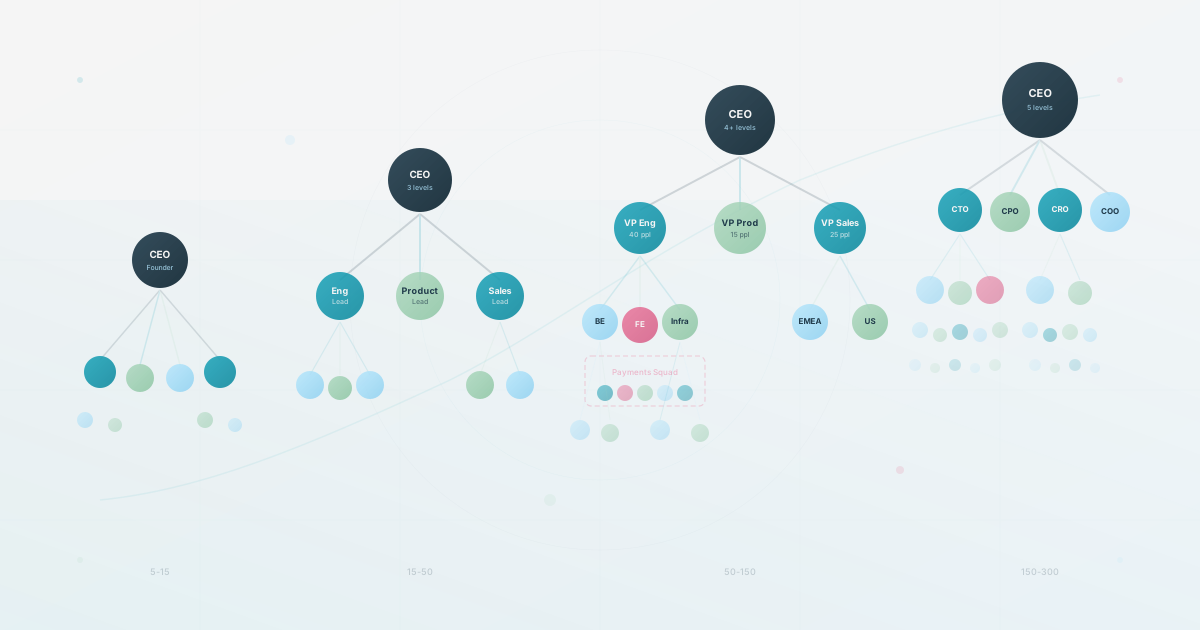
Use these ranges as planning heuristics, not rigid rules. The right time to add structure depends on hiring pace, manager load, and how difficult it is for people to find the right owner.
| Company size | Reporting baseline | Add when the team needs it |
|---|---|---|
| 5–15 | Founder-led ownership and a clear decision log | A simple team list with responsibilities |
| 15–50 | Functional leads and one visible manager per person | A searchable company chart for new hires and collaboration |
| 50–150 | Functional reporting lines plus squad or product overlays | Separate views for hierarchy, squads, and skills |
| 150–300 | Multiple management layers and shared-service teams | A maintained people directory with audience-specific access |
The reporting hierarchy should remain the canonical structure. Squads, product trios, and projects are working relationships that deserve additional views, not a maze of dotted lines in the primary chart.
Why SaaS Companies Are Different
SaaS organizational structure is distinct in ways that matter for how you build your org chart.
Continuous delivery changes how teams work. A manufacturing company ships a product, then maintains it. A SaaS company may ship frequently, so teams need a structure that supports ongoing collaboration. The squad model is one response to that problem. An illustrative 100-person SaaS mix might put a large share of people in engineering and product, but treat that as a planning scenario, not a benchmark.
Remote-first work is common in parts of tech, but policies vary by company and year. Use your own workforce data and working agreements rather than treating an older industry benchmark as a current universal rate. The durable design implication is simpler: your org chart should work for people who may not share a physical office.
On top of that, SaaS companies often resist titles and hierarchy longer than other industries. The reasoning is understandable: the early team was productive precisely because it was small and informal. But the same informality that worked at 15 becomes a liability at 50, when three people independently believe they own the same decision and nobody wants to be the person who “introduces hierarchy.” That gap between informal reality and the structure people actually need is what creates organizational debt.
Work-location flexibility does not tell you how the organization should be represented. A distributed team still needs one clear manager relationship, plus a way to show the squads, projects, or customer groups that shape daily work.
A template designed for a 100-person law firm may not answer the same questions as one for a 100-person SaaS company, even if the headcount is identical. The examples here are specific to SaaS operating patterns, not universal rules.
Stage 1: Pre-Product-Market Fit (5-15 People)
For many teams in this range, a shared document with names, responsibilities, and current work may be enough. The useful structural investment is a decision log: write down who makes final calls on product, hiring, architecture, and customer-facing messaging. Avoid adding titles or departments that do not reflect how decisions are actually made.
Stage 2: Post-Product-Market Fit (15-50 People)
You have paying customers. Revenue is growing. Hiring accelerates. For the first time, someone joins the company and does not personally know the founders.
At this stage, many teams test a first maintained org chart because new hires need a way to understand the organization they just joined. When the answer to “how do I learn who does what?” shifts from “just ask anyone” to “I have no idea,” the workflow needs attention.
The structure that works
The specifics vary, but what matters is that every person has one clear manager and every function has one clear owner. A useful starting scenario is three levels (founders, team leads, ICs) and a small set of functional groups. A dedicated People Ops role may become useful as people work accumulates, but the better signal is recurring confusion about ownership or too much people-operations work sitting with the CEO.
The flat-structure reckoning
Somewhere in this range, the flat structure ideology collides with reality.
In a small team, a conversation may resolve ambiguity quickly. As the team grows, the same question can involve more people and take longer. If several people believe they own the same decision, or senior contributors carry unacknowledged management work, make the real responsibilities visible before adding more process.
You don’t need to impose corporate hierarchy overnight. You need to name what already exists. If one person is already making architectural decisions for the backend team, make that responsibility visible. If another person is already onboarding every new salesperson, make the sales-management responsibility visible. Formalizing reality is not the same as creating bureaucracy.
Practical org chart advice for this stage
Keep it simple. A clear tree with three levels. Every person appears exactly once. No dotted lines yet. Update it when someone joins, leaves, or changes manager, then choose a review cadence that matches the team’s change rate.
A CSV import from your HR spreadsheet is one way to set this up. You may already have employee data in a spreadsheet. Test the source fields, review the generated hierarchy, and make the result accessible to the audiences that need it.
Stage 3: Scaling (50-150 People)
The 50-to-150 range is a useful planning window for testing how SaaS org structure handles complexity. Engineering may become a large part of the company, hiring may span time zones, and distinct teams may work on different areas simultaneously. Two common models then need to be compared: the functional hierarchy and the squad or pod overlay.
Traditional functional hierarchy
Departments with clear reporting lines. Engineering, Product, Design, Sales, Marketing, Customer Success, Operations, each with a VP or Director. Sub-teams within departments (Backend, Frontend, Infrastructure, QA within Engineering). Individual contributors report to team leads who report to directors who report to the CEO or COO.
This works well when: you have clear separation between what teams build, customer-facing and internal teams need different cadences, you want predictable career paths, your product is relatively monolithic.
The squad/pod model
The squad model organizes people into cross-functional teams sized for a product area or customer outcome. A sample squad might include a PM, a designer, and several engineers, sometimes with data or QA support. Use the smallest team that can make decisions without hiding dependencies.
Squads own a slice of the product end-to-end. They decide what to build, how to build it, and how to measure success. They are self-contained enough to ship independently.
This works well when: your product is modular enough for independent teams, you want speed over coordination, you trust teams to make good local decisions, your engineering culture values autonomy.
A hybrid model to test
An often-used hybrid keeps a reporting hierarchy for career development and technical standards, with a squad overlay for daily work. People have a “home” department for performance and skill growth, plus a squad for day-to-day work context. Test whether that split clarifies decisions or merely adds another layer to maintain.
Illustrative 90-person scenario, not a benchmark: Three product squads, a platform or infrastructure team, engineering managers, and customer-facing and shared-service functions. Engineers may report to engineering managers while working day to day with a PM and designer in a squad. The point is to show why both relationships need a view, not to prescribe a staffing ratio.
That creates a familiar org chart problem. The reporting structure says one thing while the working structure says another. Both relationships matter, so showing only one leaves employees guessing.
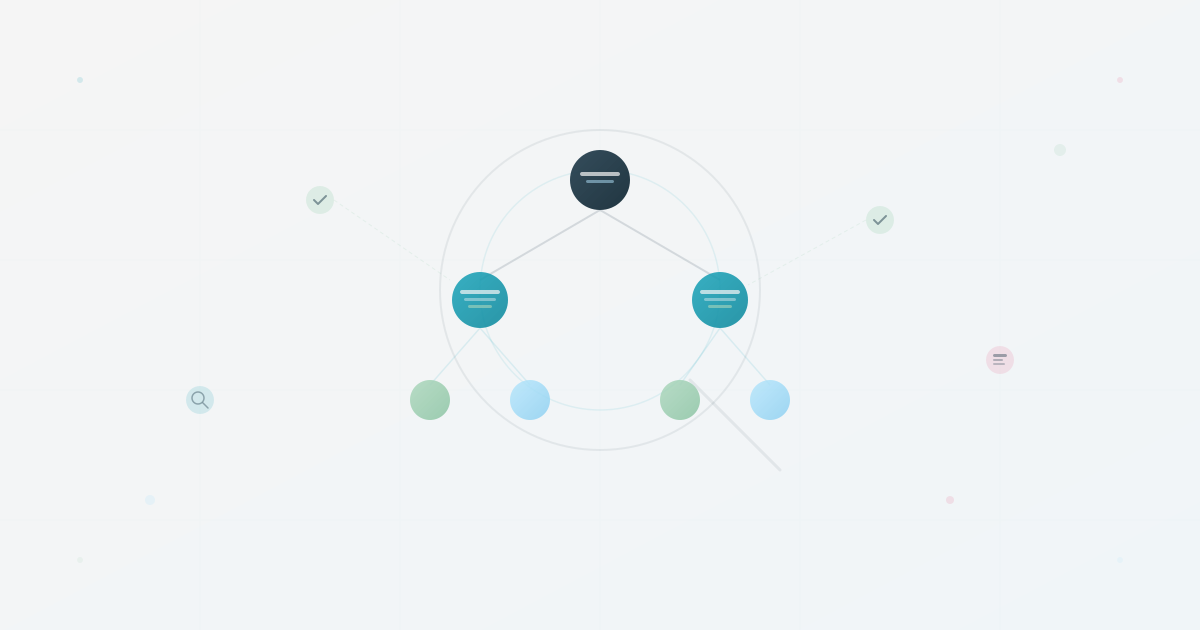
Trying to capture everything with dotted lines and matrix arrows does not work. What does: multiple views of the same organizational data. A reporting view for HR and management. A squad view for understanding who works on what. A skills view for finding expertise.
The product trio and how it changes structure
One planning scenario at this size is a “product trio”: a PM, a designer, and a tech lead making decisions together for a product area. Treat it as a working hypothesis to test, not as a universal SaaS design rule.
But the product trio does not fit neatly into a functional org chart. The PM reports to the VP of Product. The designer reports to the Head of Design. The tech lead reports to an engineering manager. They sit in three different branches of the tree, yet they make decisions as a unit every day.
The reporting lines may be correct, but the trio is invisible to the rest of the company. That matters when someone asks, “If I have a question about the billing experience, who do I talk to?” The answer is the billing trio, yet a traditional org chart does not show that working relationship.
When to restructure (and how to know you are late)
SaaS companies at this stage may restructure frequently as product areas change, teams split, or acquisitions add new groups. The pace of change means the org chart needs an owner and a repeatable update workflow.
Signs you need to restructure:
- Two teams keep stepping on each other’s work
- A working group has grown large enough that decisions now require too much coordination
- Engineers spend more time coordinating across teams than building
- New hires need longer than the team’s agreed onboarding window to understand the team structure
- Nobody can explain why a particular team exists anymore
The restructure itself is management work. Making the new structure visible to the whole company is what the org chart is for. And if employees cannot find each other after a reorg, the reorg has not landed, no matter how smart the new structure is on paper.
Stage 4: Growth (150-300 People)
Past a certain size, informal networks may no longer cover the organization reliably (we break down the stage-by-stage structural shifts separately). The org chart may shift from a helpful reference to an important navigation layer.
An illustrative design at this size may include:
- Several management layers, depending on the product and manager load
- Multiple distinct teams within engineering or another large function
- Multiple product lines or customer segments with dedicated teams
- Shared platform teams (infrastructure, developer experience, data) that serve other teams internally
- Specialized support functions such as People Ops, Legal, Finance, and Revenue Operations
The engineering org chart deserves special attention
In a larger SaaS company, engineering may be large enough to need its own internal structure. The design should make ownership, dependencies, technical mentorship, and career management visible without treating a sample staffing mix as a benchmark.
Two models dominate at this scale:
Feature teams aligned to product areas. Each team owns a vertical slice: one product surface, frontend through backend through data. Teams are independent and can ship without coordinating. Works well for companies with distinct product modules (think a platform with separate billing, messaging, analytics, and admin surfaces).
Platform + product teams. A core platform team builds shared infrastructure (APIs, auth, payments, data pipelines). Product teams build on top of the platform. The platform team does not ship customer-facing features directly; they enable other teams to ship faster. This model works when multiple product teams depend on the same underlying systems.
Neither model is universally better. The right choice depends on how your product is architected and how much shared infrastructure exists. But both models require the org chart to show dependencies between teams alongside reporting lines.
The remote-first reality at scale
Across multiple time zones, the physical office, if one exists, may represent only part of the team. Decisions cannot wait for everyone to be online simultaneously. Documentation, async communication, and organizational visibility become more important operating infrastructure.
For the org chart specifically, remote-first at scale means:
Location may need to be visible when time zones affect collaboration. A person scheduling a meeting with a billing squad needs a way to see relevant locations or working hours without guessing. Make the field visible only to the audiences that need it.
In a co-located company, people may absorb organizational context through informal contact. Distributed employees have fewer of those signals, so a stale or incomplete directory can make navigation harder. A browsable, searchable directory may be more useful than a polished diagram when the daily job is finding a person.
Onboarding compounds this. A remote new hire may spend part of the first weeks figuring out who is who and which team does what. An accurate, searchable org chart can reduce repeated routing questions, but measure that effect in the local workflow. Building durable remote culture requires more than a chart.
The shared services challenge
As product lines and business units multiply, shared-service teams such as People Ops, IT, Finance, Legal, and Revenue Operations may serve the whole company. They do not fit neatly into a product-aligned org chart.
A common mistake is hiding shared services at the bottom of the chart (implying they are less important) or creating a confusing web of dotted lines to every team they support. Neither helps anyone navigate the organization.
One option is to show shared services as their own branch with clear internal structure, then make people findable by function or expertise rather than only through the tree. Test that workflow with a real question, such as finding the person who owns data privacy, and confirm that the audience sees only the fields it needs.
Squads vs. Hierarchy: A Practical Assessment
A lot of SaaS content treats the squad model as categorically superior to traditional hierarchy. It is not. Both have failure modes, and the right choice depends on your specific context.
When squads work
Squads excel when teams can ship independently, going from idea to production without coordinating with three other teams. They also work better when product complexity is horizontal (many independent features) rather than vertical (one deeply interconnected system). Companies that do squads well share a few traits: strong engineering practices, a culture of ownership, enough senior engineers to lead each squad, and a product architecture that supports independent deployment.
When squads fail
Squads fail when teams cannot actually operate independently. If every feature touches the same database schema, the same API layer, and the same deployment pipeline, autonomous squads create coordination chaos. Five squads making independent decisions about shared infrastructure produce five incompatible approaches.
They can also create a career development problem. If an engineer’s daily work happens in a squad led by a PM, who mentors them technically and evaluates their growth? Without a functional “home” in addition to the squad, people may lose access to technical mentorship and career guidance.
The practical middle ground
Many SaaS teams land somewhere between the two: functional reporting lines for career development and technical standards, plus cross-functional squads for daily work. Both structures coexist, and the org chart needs a way to show both.
When to Formalize: A Decision Framework
One of the hardest calls for SaaS leaders is timing. Formalize too early and you create overhead that slows down a team that needs speed. Formalize too late and you get confusion, duplicated work, and frustrated employees who cannot figure out how decisions get made.
Rather than picking an arbitrary headcount, look for these signals:
- Formalize team leads when the same person is consistently the tiebreaker in a group. They already have the authority; the title makes it visible to everyone else.
- Create departments when people doing similar work need a shared manager for prioritization, performance feedback, and career development.
- Build a real org chart when new hires can no longer learn the org structure through conversations alone.
- Adopt multiple views when cross-functional teams coexist with functional reporting lines.
- Invest in searchable profiles with skills when employees repeatedly ask who has a capability or area of experience.
- Hire dedicated People Ops when people operations work is taking meaningful time from the CEO or managers and needs a clear owner.
Treat Your Org Chart Like a Product
SaaS people understand the concept of building for users. Apply the same thinking to your org chart. Your “users” are employees trying to figure out who does what, new hires trying to understand the company, managers trying to see their team’s structure, and executives trying to make decisions about organizational design.
If you would not ship a product with a three-month-old interface that nobody can search, do not accept that for your org chart either. The structure of your company is a product. Treat it like one. Keep it current, make it useful, and let the people inside it see how it all fits together.
Use this today
Plan the next stage before the next reorganization
Leave the exercise with a structure decision and one trigger for revisiting it.
- 01
Name the stage you are in and the operating problem it creates. A flat team, a functional organization, and a product-led company need different views.
- 02
Separate the solid-line manager from squad, project, location, or customer relationships. Keep those relationships as fields instead of forcing them into one tree.
- 03
Simulate two likely changes, such as a new manager and a new product squad. Check whether the same source data can represent both without duplicate charts.
- 04
Set a review trigger tied to work, such as repeated ownership confusion or a new management layer, rather than a round number of employees alone.
Pass / fail check
Your structure is ready for the next stage when employees can answer both who manages this person and who works on this outcome.
Questions readers ask most